
What Is Client-Side Processing? A Clear Guide

Alisha Anjum

Ever clicked a button on a website and watched it respond instantly, with no spinning loader in sight? That speed usually comes down to client-side processing, a term that trips up a lot of developers and designers who know it happens but can’t quite explain how. Understanding where your code actually runs matters for speed, privacy, and security, especially when you’re choosing between browser-based tools and server-dependent ones.
So what is client-side processing? In short, it means your device, not a distant server, does the work of running code and handling tasks. This guide walks through a clear definition, how it stacks up against server-side processing, its real-world uses, the tradeoffs involved, and why privacy-first browser tools lean on this approach. Stick around, because the next section breaks down exactly what’s happening behind the scenes.
Key takeaways
- Client-side processing runs code on the user’s own device, usually inside a browser, instead of on a remote server.
- It powers instant form validation, dynamic page updates, and smooth interactions without full page reloads.
- It speeds things up and protects privacy, but it’s not safe for sensitive data or business logic that needs protection.
- Most modern web apps blend client-side and server-side processing to balance speed with security.
- Browser-based tools like Tools Repository use client-side processing to keep user data private and off any server.
Table of Contents
- What is client-side processing?
- How does client-side processing work in practice?
- What are the pros and cons of client-side processing?
- Why privacy-first, browser-based tools matter
- Putting it all together
- Frequently asked questions
- Is client-side processing safe for sensitive data?
- Does client-side processing require JavaScript?
- Can client-side processing work without an internet connection?
- What is an example of client-side processing outside of forms?
- Why do browser tools like Tools Repository use client-side processing?
- Does client-side processing slow down my browser?
What is client-side processing?
Client-side processing means your browser, not a remote server, executes the code needed to run a webpage or app. It’s the technical term for tasks like rendering a page, validating a form, or updating content, all happening on your own laptop or phone. To make sense of this, it helps to picture the client-server model that runs most of the internet. Your device (the client) sends a request, such as loading a webpage, and a server somewhere else sends back the data needed to build that page. Once your browser has that data, though, a lot of the actual work, like displaying menus, checking your typed input, or animating a dropdown, happens locally without needing to ask the server again. This local execution is what people mean when they talk about client-side processing, and it’s the reason modern websites feel fast and responsive instead of clunky and delayed.
How does it differ from server-side processing?
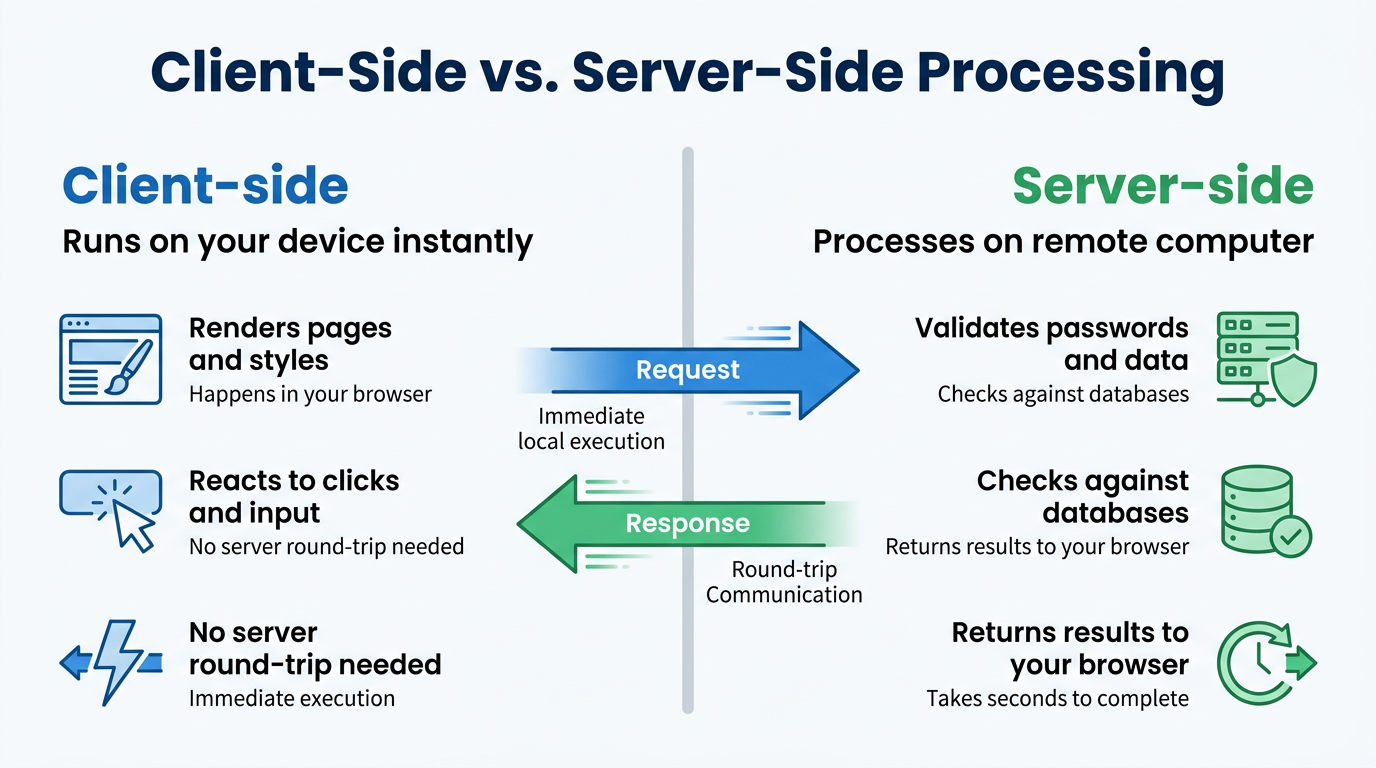
The simplest way to separate the two is this: client-side processing happens on your device, while server-side processing happens on a remote computer somewhere else, a distinction covered in depth in this client-side vs server-side guide that explains how modern frameworks let you choose where data gets processed. When your browser renders a webpage, applies styles, or reacts to a click, that’s client-side work happening right on your screen. When a website needs to check your password against a database or pull up your order history, that request travels to a server, gets processed there, and the result comes back to you. A quick example makes this clearer. If a page instantly highlights a form field in red because you left it blank, that’s client-side. If the same page needs a few seconds to confirm your login details against a database, that round trip is server-side processing at work.
How does client-side processing work in practice?
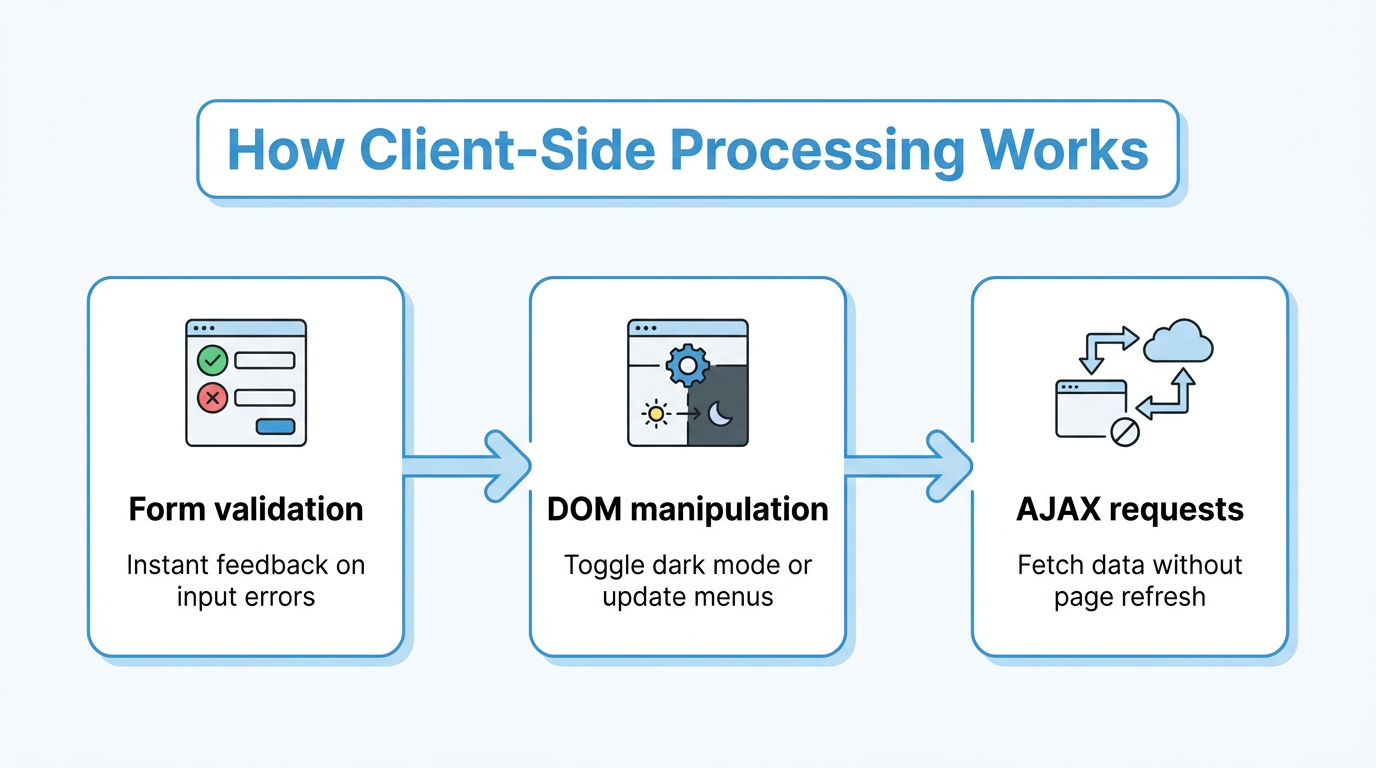
Client-side processing works through JavaScript, the scripting language built into every modern browser that lets code run directly on a user’s device. It’s the technology behind nearly every interactive feature you take for granted, from dropdown menus to live search results. Because JavaScript ships with the webpage itself, the browser can execute it the moment the page loads, without waiting on a server for permission or data. This is what makes buttons feel clickable the instant you tap them and forms feel responsive as you type. A few everyday examples show exactly how this plays out in practice, and each one demonstrates a different strength of processing tasks locally instead of bouncing everything back to a server.
Form validation
Form validation is the clearest everyday example of client-side processing at work. The moment you leave a required field blank or type an email address missing the “@” symbol, JavaScript flags the problem instantly, before you even hit submit. This saves you from the annoying cycle of submitting a form, waiting, and getting an error message seconds later. It also reduces unnecessary traffic to the server, since invalid entries get caught and corrected before they’re ever sent.
DOM manipulation
DOM manipulation refers to JavaScript changing the structure or style of a webpage after it has loaded. The Document Object Model, or DOM, is simply the browser’s internal map of everything on the page, and JavaScript can rewrite parts of that map on the fly. Toggling dark mode is a classic example, since the whole color scheme flips instantly without reloading anything. Expanding menus, updating prices live, and popping up notifications all rely on this same technique.
Asynchronous requests (AJAX)
Asynchronous requests, often built with a technique called AJAX, let a page quietly fetch new data from a server without refreshing the whole screen. Auto-saving a document as you type, infinite scroll feeds, and live search suggestions all depend on this pattern. The trick is that the interaction feels instant and local, even though data is being exchanged with a server in the background. This keeps things smooth for the user while still allowing the app to stay in sync with fresh information.
What are the pros and cons of client-side processing?
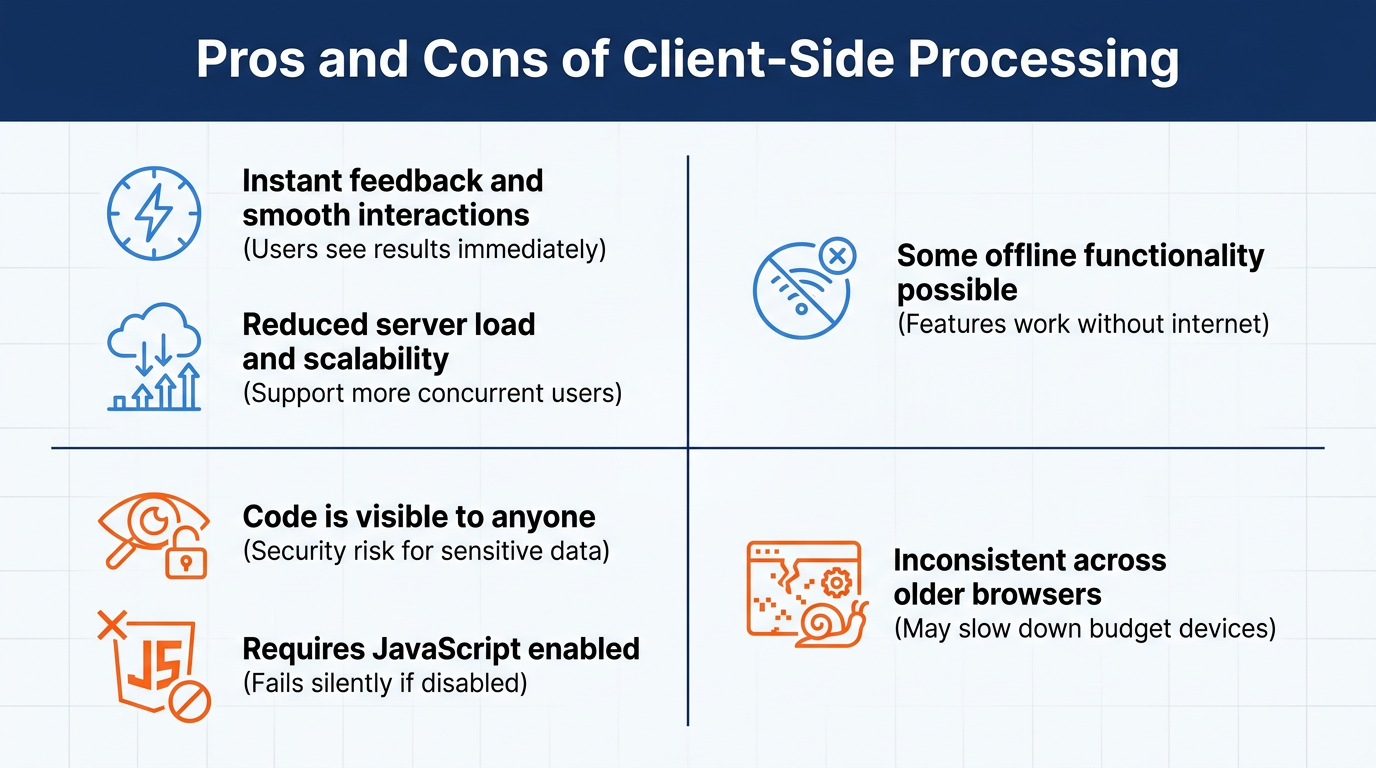
Client-side processing brings clear speed and scalability wins, but it also opens the door to security and consistency issues developers can’t ignore. Because tasks run locally, users get near-instant feedback and servers handle less traffic overall, which is a genuine advantage for both experience and infrastructure costs. On the flip side, anything that runs in a browser can be viewed, copied, or altered by anyone with basic technical know-how, and that visibility creates real risk for sensitive operations. Getting the balance right means knowing exactly where the benefits stop and the limitations begin, which is exactly what the next two sections lay out.
Key benefits
- Instant feedback and smoother interactions mean users see results the moment they act, rather than waiting on a server response for every click or keystroke.
- Reduced server load and better scalability let applications support far more concurrent users without needing constant infrastructure upgrades.
- Some offline functionality becomes possible through browser storage and service workers, so certain features keep working even without an active connection.
Key limitations
Client-side code is never fully secure, because anyone can open their browser’s developer tools and view, copy, or edit whatever JavaScript is running. This makes it a poor place to hide passwords, proprietary algorithms, or any validation rule that absolutely must not be bypassed.
Client-side validation should always be treated as a convenience layer rather than a security boundary.
— Cory Rylan, front-end developer
Beyond that exposure, client-side processing depends entirely on JavaScript being enabled, and it can behave inconsistently across older browsers or budget devices. If a user disables JavaScript, or their device struggles with heavy scripts, the whole experience can slow down or break outright. That’s why developers pair client-side conveniences with server-side checks for anything that truly matters.
Why privacy-first, browser-based tools matter
Privacy-first browser tools matter because client-side processing keeps your data on your own device instead of sending it off to a server you don’t control. Since the code runs locally, a well-built tool never needs to upload your text, code, or files anywhere to do its job, which removes an entire category of privacy risk. This principle is exactly what Tools Repository applies across its collection of more than 100 free browser-based tools, including formatters, converters, and generators. Every one of these tools runs entirely in your browser, with no login required and no data collection happening behind the scenes. For anyone who’s ever hesitated before pasting a private code snippet or a client’s data into an unfamiliar website, this local-only approach removes that worry completely.
How this benefits developers, designers, and students

For developers, designers, and students juggling quick daily tasks, this setup means instantly formatting code, checking color contrast, or converting a data file without installing anything or creating an account. There’s no signup wall, no tracking script following you around afterward, and no subscription fee eating into a freelance budget. It’s the kind of frictionless access that fits neatly between bigger project tasks, exactly when you need a fast answer and nothing else.
Putting it all together
Client-side processing is what makes the modern web feel fast, private, and responsive, but it works best paired with server-side checks for anything involving passwords, payments, or sensitive business logic. Neither approach should carry the whole load alone. The smartest applications split responsibilities deliberately, letting your device handle instant feedback while a server handles anything that truly needs protection.
If you want to feel this speed and privacy firsthand, try a few free, privacy-first browser tools built on this exact principle, like the ones on Tools Repository. Since everything runs locally, you get quick results without wondering where your data ends up afterward.
Frequently asked questions
Is client-side processing safe for sensitive data?
No, it isn’t. Client-side code is visible and editable by anyone using browser developer tools, so passwords, personal details, or business logic need server-side protection as well. Treat client-side checks as a convenience for users, never as your only line of defense for anything sensitive.
Does client-side processing require JavaScript?
Yes, JavaScript is the main language that makes client-side processing possible inside browsers. Without it enabled, most interactive features like form validation, dynamic menus, and live updates stop working entirely, leaving only static content behind.
Can client-side processing work without an internet connection?
Some tasks can, thanks to browser storage and service workers that cache data locally. Whether this works depends entirely on how the app was built and whether it was designed with offline caching in mind from the start.
What is an example of client-side processing outside of forms?
Browser-based utilities like color contrast checkers or JSON formatters are great examples. They process everything locally inside your browser tab, so your text or code never gets uploaded or sent anywhere else.
Why do browser tools like Tools Repository use client-side processing?
It keeps user data private since nothing gets uploaded to a server, supports genuinely fast results, and removes the need for accounts, logins, or installations. That combination is exactly why so many privacy-conscious tools are built this way.
Does client-side processing slow down my browser?
It can, especially on older devices or when a page runs heavy, poorly optimized scripts. Well-built tools, though, are designed to run quickly and efficiently, so most users notice little to no impact on browser performance.